
HackMii

Notes from inside your Wii

HackMii header image 2

Autopsy of a Mario-Kart brick (part 1)

May 8th, 2008 by bushing · 61 Comments

I have a “bitch” Wii — a Wii that I use specifically for testing out NAND flash hacks.  I bought it on eBay, and it came with a broken drive — not a modchip disaster, but an actual launch-day Wii with an expired warranty.  It had never been connected to the network, and had only played 4 or 5 games — so it only contained IOS9.  It’s about as close to a “virgin” Wii as I ever expect to see.  (I’ll refer to this often as my “ios9wii”).

Before playing, I backed up all of the contents with my Infectus.  I then booted a PAL copy of Mario Kart.  It recognized the disc, and told me it needed to install an update.  It started to update, but never finished — after about 30 minutes, I decided it was probably a lost cause, and power-cycled it.  I was greeted with this, a slight variation on a theme:
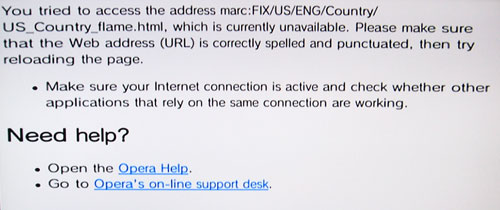
Mario Kart-PAL brick (NTSC system)

I then dumped the flash again (90 mins), and then flashed back to the original dump (6 hours :( :( :().   We can now compare the two to see what happened.

This may not be the best comparison possible, since so many other changes happened between IOS9 and IOS36 — if I need to, I’ll pick a different route to brick.

The easiest way to start is by extracting the contents of each dump — before and after — with Segher’s zestig utility.  Then, we compare the two.  We get:

Only in ios9wii:

  • /shared2/sys/net/config.dat
  • /title/00010000: 0000dead, 00555044, 3132314a, 31323245, 3132334a, 52504c45, 52544845
  • /title/00000001/00000100/00000000.app
  • /title/00000001/00000101/00000000.app

Only in mkart-bricked:

  • /shared1: 00000001.app - 00000025.app
  • /shared2/sys/net/02/config.dat
  • /shared2/test2/nanderr.log
  • /shared2/wc24: nwc24dl.bin, nwc24fls.bin
  • /ticket/00000001: 0000000b.tik - 00000024.tik
  • /ticket/00010008/48414b50.tik
  • /title/00000001/00000002/content: 000000{3b,3c,3d}.app
  • /title/00000001/00000002/data/tmds.sys
  • /title/00000001/00000100/content: 00000001.app, 00000002.app
  • /title/00000001/00000101/content: 00000005.app, 00000006.app
  • /title/00000001: 0000000b - 00000024
  • /tmp/sys
  • /tmp/www.arc

Modified between dumps:

  • /shared1/content.map
  • /shared2/sys/SYSCONF
  • /shared2/wc24/mbox: wc24recv.ctl, wc24recv.mbx
  • /shared2/wc24: nwc24msg.cbk, nwc24msg.cfg
  • /sys: space.sys, uid.sys
  • /ticket/00000001: 00000002.tik, 00000100.tik, 00000101.tik
  • /title/00000001/00000{002,100,101}/content/title.tmd
  • /title/00000001/00000002/data: cache.dat, cdb.vff, iplsave.bin, state.dat

 
There are so many new files in the mkart dump because it installed all of the new versions of IOS. Also, in the process, it moved some files (e.g. config.data). Titles 1-2 (System Menu), 1-100 (BC) and 1-101 (MIOS) were upgraded. These also placed files in /shared1.

We can safely ignore the WC24 stuff. We can also ignore the added tmds and tickets for the new IOS versions, and all the files associated with the upgrades for 1-2, 1-100, 1-101. The title directory for 48414b50 has no data or contents. The /tmp files are interesting, because it shows we were in the middle of an operation — more on that later.

It’s getting late and I’m tired, so I will have to continue this later. However, I do have some goodies for those of you that want to dig into this yourselves:

ios9wii dump skeleton (zip file)
mkart-bricked directory skeleton (zip file)

(Note, the above archives have some of the “content” files removed to avoid legal issues and to save on bandwidth. They aren’t relevant to this discussion, anyway.)

I’d welcome any theories as to what the specific problem is, based on the contents of those two zip files.

Here are the files I will be talking about tomorrow — take a look and see what useful data you can extract from them:
ios9_fs_metadatabin.bz2
mkart_fs_metadatabin.bz2
mkart-sffs.zip

Tags: Wii

61 responses so far ↓

  • 1 Phredreeke // May 8, 2008 at 5:31 am

    I wonder why it would update MIOS? I know it’s not relevant to the bricking, but it makes me curious.

  • 2 Anonymous coward // May 8, 2008 at 5:38 am

    I vaguely remember there was an update which blocked Freeloader in Gamecube mode, it could be that.

  • 3 Nils // May 8, 2008 at 5:54 am

    Cool, this is like homework.

  • 4 svenk91 // May 8, 2008 at 6:20 am

    Anonymous coward: there was indeed an update that blocked some homebrew/action replay stuff by blovking their disc ID’s (that made the wiikey configuration disc stopping to work etc.) and hwen where action replay couldn be used to load cube homebrew at all indeed. and probally some minor fixes.

    Nils:
    dude, how can you put cool and homework in one sentence? :/

  • 5 azeazezar // May 8, 2008 at 9:44 am

    svenk91
    Dude, you just did it yourself…

  • 6 Jinxvorheeze // May 8, 2008 at 12:23 pm

    Hello Jinxvorheeze here with a brief overview of the differences f the filesystems for ios9wii, and brickedwii. I didn’t go too far
    into the diffence of coding of the files unless a major diffence was present >0kb size diffence. If you have any questions you can contact me at
    “jinxvorheeze@hotmail.com”

    Differences:
    \mkart-bricked\sys\space.sys is 19kb and is 19140 characters long, compared to
    \ios9wii\sys\space.sys is only 1kb and is only 224 characters long. Both are filled with |NUL| space.

    ios9wii\shared1 directory only has 2 files in it. “00000000.app” and “content.map” The content file is
    only 1kb and has 28 characters on the inside, directing it to the 00000000 file.
    \mkart-bricked\shared1 directory has 39 files inside.
    00000000.app
    0000000a.app
    0000000b.app
    0000000c.app
    0000000d.app
    0000000e.app
    0000000f.app
    00000001.app
    0000001a.app
    0000001b.app
    0000001c.app
    0000001d.app
    0000001e.app
    0000001f.app
    but this is where the structure changes as the rest of the files don’t use the a-f structure and show up as:
    00000002.app
    00000003.app
    00000004.app
    00000005.app
    00000006.app
    00000007.app
    00000008.app
    00000009.app
    00000010.app
    00000011.app
    00000012.app
    00000013.app
    00000014.app
    00000015.app
    00000016.app
    00000017.app
    00000018.app
    00000019.app
    00000020.app
    00000021.app
    00000022.app
    00000023.app
    00000024.app
    00000025.app
    content.map

    Now the bricked wii content.map file is only 2kb, but it is 1064 characters long and points to files in this order:
    00000000.app
    00000001.app
    00000002.app
    00000003.app
    00000004.app
    00000005.app
    00000006.app
    00000007.app
    00000008.app
    00000009.app
    0000000a.app
    0000000b.app
    0000000c.app
    0000000d.app
    0000000e.app
    0000000f.app
    00000010.app
    00000011.app
    00000012.app
    00000013.app
    00000014.app
    00000015.app
    00000016.app
    00000017.app
    00000018.app
    00000019.app
    0000001a.app
    0000001b.app
    0000001c.app
    0000001d.app
    0000001e.app
    0000001f.app
    00000020.app
    00000021.app
    00000022.app
    00000023.app
    00000024.app
    00000025.app

    Next we will move on to the \shared2 folder.
    \ios9wii\shared2 has 4 directories inside “menu” “sys” “test” and “wc24″
    \mkart-bricked\shared2 has 5 directories. All the same except for a “test2″ folder which contains a nand error log with
    “1 2006/01/01 00:04:46 00000001-00000002 Created log file.” on the inside. 00000001-00000002 probably referring to the new .app files
    that were found within the shared1 folder. This test2 folder does not exist under the ios9wii dump because the nand test app is not there.
    This leads me to believe that the content file ponts to 00000000.app first because it is startup code for wii applications and 00000001-00000009
    are system tests that the wii goes through to test the nand of the wii before allow it to run the other app files within the content.map file.

    Starting with the “menu” folder, both dumps are the same.
    The “sys” folder is the same, except the bricked wii dump filesystem goes “shared2\sys\net2\config.dat”, while the ios9 dump is only
    “shared2\sys\net\config.dat”.
    The “test” folder only contains one file in both called “testlog.txt” they are the same size and compared are the same test on the inside.
    “BOARD_TEST=START,V4.0
    BOARD_TEST=OK,V4.0
    FINAL_TEST=START,V1.0
    FINAL_TEST=OK,V1.0
    WRITE_NAND_DATA1=START,1.3.0
    AGING_TEST=LOOP 1/19,1.0.0

    AGING_TEST=LOOP 2/19,1.0.0
    AGING_TEST=LOOP 3/19,1.0.0
    AGING_TEST=LOOP 4/19,1.0.0
    AGING_TEST=LOOP 5/19,1.0.0

    AGING_TEST=LOOP 6/19,1.0.0
    AGING_TEST=LOOP 7/19,1.0.0
    AGING_TEST=LOOP 8/19,1.0.0
    AGING_TEST=LOOP 9/19,1.0.0

    AGING_TEST=LOOP 10/19,1.0.0
    AGING_TEST=LOOP 11/19,1.0.0
    AGING_TEST=LOOP 12/19,1.0.0
    AGING_TEST=LOOP 13/19,1.0.0

    AGING_TEST=LOOP 14/19,1.0.0
    AGING_TEST=LOOP 15/19,1.0.0
    AGING_TEST=LOOP 16/19,1.0.0
    AGING_TEST=LOOP 17/19,1.0.0

    AGING_TEST=LOOP 18/19,1.0.0
    AGING_TEST=OK,1.0.0
    WRITE_NAND_DATA1=OK,1.3.0
    SERIAL_NO_REGISTER=OK,1.2.0
    WIRELESS_TEST=OK,RVL001.01

    PRECHECK_DATA=START,1.4.0
    PRECHECK_DATA=OK,1.4.0
    CHECK_NAND_DATA=START,1.4.0
    CHECK_NAND_DATA=OK,1.4.0
    ” (dumped from the ios9wii)
    Now the biggest difference in the “shared2″ folder is the wc24 directory. The ios9wii dump only contains 3 files and an “mbox” directory
    The files are as follows:
    nwc24fl.bin
    nwc24msg.cbk
    nwc24msg.cfg

    The brickedwii dump contains 5 files and the same “mbox” directory. The files for the bricked wii are as follows:
    nwc24fl.bin
    nwc24fls.bin
    nwc24dl.bin
    nwc24msg.cbk
    nwc24msg.cfg
    I would assume by my work with PSP firmwares that nwc24fl.bin, nwc24fls.bin, and nwc24dl.bin refer to firmware flashes. nwc24fl.bin being the original Wii firmware flash.
    This also leads me to believe that since the firmware flashes are stored in the WiiConnect24 directory, then the process of flashing, or atleast testing or comparing the
    flash is carried out by a WiiConnect24 process, which is why the bricked Wii shows up with a webpage.

    The ticket directories are the same except one sub-directory which shows up called “00010008″ containing one empty file called “sorry” (no file extension) found in the bricked firmware.

    This folder also shows up in the “title” directory, with subfolder “48414b50″. This folder has subfolders “content” and “data” which are also both empty.

    The last difference is in the tmp directory. On the ios9wii dump this folder is empty. But on the bricked wii dump it contains one file called “www.arc” which is 23kb and when opened seems
    to be a configuration file for the Opera browser. The Directory also contains one sub-folder which is empty.

  • 7 Jinxvorheeze // May 8, 2008 at 12:28 pm

    http://rapidshare.com/files/113512029/compare.txt.html

    That is a link to my comparison for the two filesystems. I hope you find something interesting in it although I’m not super familiar with the Wii NAND or Firmwares, I have been coding patches for CFW for PSP for about a year. The most notible being the 3.71m33-3 PSP -PS3 remote play overwrite. Using PSP firmware 3.72 official’s Remote play and injecing it into the Dark-Alex CFW 3.71m33-2 or-3

  • 8 hotzenplotz // May 8, 2008 at 2:41 pm

    No offence Jinxvorheeze, but you should have read bushing’s post (”We can safely ignore the WC24 stuff.”) and taken a look at wiibrew.org (for a start: “http://wiibrew.org/index.php?title=Flash_filesystem”) before “comparing”…

  • 9 Jinxvorheeze // May 8, 2008 at 6:10 pm

    I said in the file that it was a quick comparison, and If its useless then don’t use it. I also said that I wasn’t very familiar with the Wii NAND and firmware. I did read bushing’s post, and thought I would contribute my idea’s, as he said he would welcome any idea’s people had. Didn’t know it had to be the most eye opening comparison in the world, and that every little bit helped. But I’m glad to see your official comparison of the two files. I really enjoy the way you did an extensive and knowledgable comparison so that we could all be made to better understand everything you obviously already know. Oh wait. You didn’t actually attempt to contribute anything. You were too busy flaming people for trying to help. No offence.

  • 10 hotzenplotz // May 9, 2008 at 2:46 am

    I meant what I said, I did not want to offend you because you obviously are one of the few people that do contribute and I appreciate that.

    But in this case you just wasted your energy because you tried to analyse something, you obviously don’t know much about and that just led to some wrong assumptions.

    I apologize if that came across like I was trying to flame you.

    And by the way, I don’t know enough about that stuff either, so I see no point in trying to compare the files myself.

  • 11 galtor // May 9, 2008 at 3:09 am

    Based on “mkart-sffs.zip” this is the timeline:

    1.- Create //shared2/wc24/nwc24dl.bin
    2.- Fill //shared2/wc24/nwc24dl.bin
    3.- CreateDir //tmp/sys
    4.- CreateDir //tmp/sys/00000000
    5.- Create //tmp/sys/00000000/iplsave.bin (empty)
    6.- Fill //tmp/sys/00000000/iplsave.bin
    7.- Create //tmp/www.arc (empty)
    8.- This is a big change:
    Move //tmp/sys/00000000/iplsave.bin to //title/00000001/00000002/data/iplsave.bin (overwriting old one)
    Modify //title/00000001/00000002/data/tmds.sys
    Modify //shared2/wc24/nwc24dl.bin
    Modify //shared2/wc24/nwc24fls.bin
    Modify //shared2/sys/net/02/config.dat
    Modify //title/00010002/48414341/data/NigaoeCh.dat (a savegame?)
    9.- DeleteDir //tmp/sys/00000000
    10.- CreateDir //tmp/sys/00000001
    11.- Create //tmp/sys/00000001/www.arc (empty)
    12.- Fill //tmp/sys/00000001/www.arc
    13.- Move //tmp/sys/00000001/www.arc to //tmp/www.arc (overwriting, its a U8 file with opera config files)
    14.- DeleteDir //tmp/sys/00000001
    15.- Modify //shared2/sys/SYSCONF

    ——————-

    That’s all for now, waiting for next chapter :)

  • 12 skiddd // May 9, 2008 at 4:18 am

    @bushing

    “I then dumped the flash again (90 mins), and then flashed back to the original dump (6 hours :( :(). We can now compare the two to see what happened.”

    Why does it take too long? Because of Infectus?

    Anyway, you were right about the alauda ;-(
    Seems like it is not capable of handling 2048+
    pages at all.

    So I’m off to buy a “bitch” Wii too and hopefully
    I can make a better NAND programmer for it
    using very cheap components (Ft232BM + xc2c256)

    I do a lot of verilog and I already have a basic
    sekleton code for my dev board. I just need to
    study the datasheet for this NAND and hopefully
    I could make a better NAND programmer for
    the Wii.

    Anyway, I will keep you posted.

    B.R.
    skiddd

  • 13 Dasda // May 9, 2008 at 6:37 am

    @ Bushing:
    The error occurs when the marc:// protocol cannot find a file. MARC probably stands for mount ARC (because that’s what it does).
    It’s known on the Wiibrew Wiki as a U8 archive, because that’s it’s header translated to ASCII.

    Notice that you have an American Wii, and it’s looking for a American file (hence the “US” in the path). Therefore I bet that the archive (which would contain the American file) got overwritten by the Europe/PAL file, so it doesn’t exist anymore.

    But I don’t know which ARC it mounts, it should somewhere in the content-files for the Wii Menu. You can use your diffs to find it, hopefully.

  • 14 bushing // May 9, 2008 at 7:05 am

    @ Jinxvorheeze /hotzenplotz: I’m always glad to have new people look at this stuff and bring fresh insight — often, that’s the only way this stuff gets done. When I have a bit of time, I’ll go through and annotate J’s analysis to compare it with mine, and make sure I didn’t miss anything.

    @skiddd: Yes, the slow speed is due to the Infectus. Reading a 2112-byte page requires 4 USB transmit / ack sequences:

    1. Send read command (include address)
    2. Wait for ack
    3. Send read confirmation command
    4. Wait for ack
    5. request 0×210 bytes
    6. Wait for response
    7,8,9,10,11,12: repeat 5 and 6 to get all 4 subpages

    Because of this, reading a page takes about 1.6 seconds or so. Writing a page takes much, much longer — 6 seconds or, although using some dirty tricks I can get that down to 4ish seconds.

    Anyway, I can go into this at more depth later. I’d be very interested in helping out design / manufacture a cheap, fast flash-chip programming device. Even as an open project (ala LadyAda / adafruit.com), I’m sure there would be plenty of people who would buy a reasonably-priced kit or assembled unit.

    I know quite a bit about the actual programming protocol for these chips from having written this program — and I have a Spartan3E board — but don’t know how to use it! :(

    Anyway, we should probably take this offline … heh

  • 15 kwijibo // May 9, 2008 at 7:53 am

    Why read the NAND through hardware? Isn’t there software that can dump it to an sd card?

  • 16 krall // May 9, 2008 at 8:30 am

    kwijibo: you mean like running software on a bricked wii? ;-)

  • 17 Newbie // May 9, 2008 at 11:22 am

    I’m sure there would be plenty of people who would buy a reasonably-priced kit or assembled unit.
    A loosely coupled question :-)
    From all previous bushing posts it’s clear that Wii keeps writing to NAND (thus keeps modifying it) every 20 seconds or so. Is there any way to take coherent snapshot of NAND without any additional hardware [by means of Twilight Hack]?
    Having that done give us a “peace of mind” while waiting for “reasonably-priced kit”. :-)
    On the same note: once NAND backup is taken, how its integrity can be verified?

    If there is an easy way to do it… I guess, you will see soon a growing crowd willing to pay in advance to get their kit ASAP! :-)

  • 18 Newbie // May 9, 2008 at 11:39 am

    Yes, the slow speed is due to the Infectus. Reading a 2112-byte page requires 4 USB transmit / ack sequences
    IMO, nothing much can be done on PC side. The only way to improve speed drastically is to change Infectus [Wii] part to work with much bugger I/O size (like 64K or more, ideally most of the free PIC RAM). I’m not that familiar with flush programming, but seemed the problem is well known in “remoting” programming. Instead of requesting 0, 1, 2… N-1 sequentially we do request all 0…N-1 in one shot…
    Sorry for useless comment…

  • 19 kwijibo // May 9, 2008 at 12:28 pm

    krall: I said read the NAND - this has to be done before bricking, writing would have to be done with hardware. Isn’t there homebrew that can dump the NAND file system, or is the NAND modified by the console during booting so that this wouldn’t work?

  • 20 Dasda // May 9, 2008 at 12:30 pm

    Newbie: Of course it’s possible to dump current NAND using the IOS /dev/flash tree (this will give you access to the whole NAND flash, but it’s still encrypted using your nand-key).

  • 21 kwijibo // May 9, 2008 at 12:43 pm

    If I want a backup, why does the encryption matter? I make a dump of the encrypted flash, and if my console is bricked at a later time I can reprogram the flash with the encrypted dump (presumably you could do this with the console turned off).

  • 22 Newbie // May 9, 2008 at 12:46 pm

    @Dasda
    but it’s still encrypted using your nand-key
    Isn’t it exactly what we need to flush it back later?

    And how do we verify its integrity?
    Do we need that wii nand-key to do it?

  • 23 Newbie // May 9, 2008 at 12:52 pm

    @kwijibo
    presumably you could do this with the console turned off
    IMO, It depends how NAND chip is powered. I.e. is it possible to power-up NAND only, without powering other chips, which keeps writing to it.

  • 24 Dasda // May 9, 2008 at 1:00 pm

    I’m sorry if I’m unclear somewhere, I cannot seem to write proper English today. I’m probably too tired.

    Yes, you shouldn’t worry about the encryption if you’re just going to make a backup. That backup is probably all you need in order to un-brick your Wii in the future. However you will need a Infectus to restore the backup you made. We do not need the nand-key for that.

  • 25 kwijibo // May 9, 2008 at 1:36 pm

    I think I’ll dump my NAND soon then. I want to try and implement a NAND interface with a microcontroller instead of using an Infectus board, are there are any other pictures of how the Infectus is wired to the flash chip? Also, Wiibrew just lists one Samsung chip for the Wii, so all consoles have the same model?

  • 26 Newbie // May 9, 2008 at 3:03 pm

    Bushing post a link early:
    http://www.openwii.org/forums/viewtopic.php?t=312&postdays=0&postorder=asc&start=0
    Read BillW post from Posted: Tue May 22, 2007 8:37 pm
    “He was searching for a common device that contained wii-compatible nand chips. Nintendo uses two different models of flash, one from Hynix and the other from Samsung. They use one or the other depending on availability/price.”

  • 27 bushing // May 10, 2008 at 2:09 am

    @Galtor: Excellent! That’s exactly what I was hoping for, and I’ll start my next entry using your analysis.

    @Dasda: It’s almost not important which exact file it is that the system menu is looking for. After all, if we could replace that file, we could more easily patch the system menu code. There are lots of different ways to fix it — all of them hard. I want to try to figure out the simplest way.

    @kwijibo: Yes. I used software to dump the “before” / ios9wii image, and then had to use hardware to dump the bricked image.

    @Newbie: There are four different “conflicting access” scenarios:
    1. Wii reads from flash while software dumps flash
    2. Wii writes to flash while software dumps flash
    3. Wii reads from flash while hardware dumps flash
    4. Wii writes to flash while hardware dumps flash

    3 and 4 will cause data corruption, because the electrical signals will interfere with each other as the Infectus chip tries to fight with the Hollywood over control of the NAND flash I/Os. 1 is always safe, because the system will queue up the read requests.

    2 is theoretically problematic, but has never yet been a problem (and would be difficult to solve).

    As for the integrity checks — there are some simple checks you can do — parity checks. My amoxiflash program will do that (even if you don’t have an Infectus chip).

    @Kwijibo: You, skidd and I really need to sit down and figure this out for real. :) There are two different chips — a Samsung and a Hynix part — but they operate the same way (same commands, etc).

  • 28 skiddd // May 10, 2008 at 6:34 am

    @bushing

    For your Spartan3E dev board, I think there
    are some generic IP in xilinx website that can
    be used to read off some generic NANDs.

    But personally, I think it will be more effective
    to make something from scratch and just use a
    plain CPLD instead of FGPA so that we use less
    parts (no need to load configutation file to
    FPGA etc..) and the verilog code can be fully
    customized and optimized for the specific
    NANDs currently available in most Wii consoles.

    Also, I bought a “bitch” Wii today for 120 U$D.
    It’s a JAP version with everything functional
    except for the Parental Lock code ;-(( The stupid
    seller did not even bother to tell me about it.
    Anyway, I think I wont be needing that 4-digit
    code it for now.

    I also contacted some friends in china so I can
    get some blank samples of the NAND chip used
    in this JAP Wii (Samsung chip inside). It would
    be safer for me to test on these blank NANDs
    rather than risking the development stage on the
    actual NAND on the “bitch” Wii.

    At the xilinx website, I also recall seeing some
    verilog source codes for NAND flash chips. I
    need to check on them again to see if they are
    applicable for our purpose.

    So in short, I can help on the Hardware side of
    this project… But analyzing the contents of that
    encrypted NAND is something I am not really
    good at ;-(.

    I will keep you posted ;-)

    B.R.
    skiddd

  • 29 skiddd // May 10, 2008 at 6:42 am

    @bushing

    NAND flash interface for CoolrunnerII CPLD
    from Xilinx ;-)…

    http://www.xilinx.com/support/documentation/application_notes/xapp354.pdf

    B.R.

  • 30 skiddd // May 10, 2008 at 6:43 am

    Just need to change the current parameters
    to support 2048+ECC pages.

    Cant wait to get my hands on some blank NANDs!

  • 31 raulpica // May 10, 2008 at 9:39 am

    @skiddd

    Try the link I posted as my website, for the Parental Lock code. That explains where the code is stored in the NAND flash and how you can easily recover it.

  • 32 Newbie // May 10, 2008 at 10:57 am

    @bushing & Dasda
    As for the integrity checks — there are some simple checks you can do — parity checks. My amoxiflash program will do that (even if you don’t have an Infectus chip).
    Ok. I meant this: Suppose I made NAND dump already and it’s encrypted with Wii nand-key.
    How do I verify integrity of the dump? I.e. make sure no #2..4 “conflicting access” scenarios has happed during backup? Do I need the Wii nand-key to do it? Are there any other ECC check can be performed?
    I don’t see how simple parity checks can help it’s just too weak…

    BTW: What program do you recommend to perform a dump?

    @skiddd,
    Wow I didn’t know about @raulpica solution.
    I do know, you can always call Nintendo support. They are able to reset lock easily. Not sure if they do it for free once warranty is expired though…

  • 33 Dasda // May 10, 2008 at 12:14 pm

    Newbie:
    I think the dump should have the following format:
    http://wiibrew.org/index.php?title=NAND_Flash_layout

    Check it out, and see what you can do.

  • 34 CaitSith2 // May 10, 2008 at 3:52 pm

    @skiddd, If you do decide to call nintendo, do NOT tell them that it is a second hand unit. They may well refuse to give you the master code then. Hope and pray that the previous owner did not call nintendo for that Wii, for the same purpose. Nintendo may well have recorded the confirmation code as having an unlock code issued, if they did. In any case, try to bullshit about having bought the Wii yourself, if possible.

    If they do give you the master code, Write that code, and the date it was given somewhere. That code/date can always be used to reset the parental controls, as Nintendo has chosen to not lock down the date/time setting with parental controls.

    Alternatively, you can follow @raulpica’s solution. (In which, I had posted some additional tidbits related to this myself.)

  • 35 skiddd // May 11, 2008 at 2:18 am

    @CaitSith2

    They told me to call Customer Service in
    Nintendo Japan ;-((

    Anyway. I’ve been trying to make a boot DVD
    for that “fs-dumper.dol”… but so far I only
    get the Gamecube Menu when the Wii recognizes
    the disc. When I try to load the disc, it just gives
    me a blank screen.

  • 36 CaitSith2 // May 11, 2008 at 11:29 am

    @Skiddd

    Did they Ask you for Both the serial number and the Confirmation number, or did they ask for just the Confirmation number? If it is just the Confirmation number, It may be possible for them to determine where the Wii came from, on that alone.

  • 37 Newbie // May 11, 2008 at 2:14 pm

    @Dasda… & bushing
    Ok. So pages 0×40 - 0×89 has to be the same as 0×140 - 0×189 [boot2 first/second copy]
    0×200-0×3f7ff [Encrypted file system data] has to be verified with HMAC key
    0×3F800 - 0×40000 [Filesystem metadata] – not clear if this need to be verified at all. I.e. can Wii still boot if there is complete garbage or all zeros there?

    Just to reiterate – Wii won’t boot if boot2 or Encrypted file system data corrupted. How we can verify them?
    Or do you guys think, I keep asking wrong or non important question?

  • 38 Newbie // May 11, 2008 at 2:22 pm

    Similar question:
    IMO, there are 2 ways to perform a Wii NAND restore.
    You ether need the Wii NAND encrypted backup or you have both the Wii AES & HMAC keys and an unencrypted backup and a program to apply encryption.

    And my favorite question: how do we verify the Wii AES & HMAC keys are the right ones?
    IMO, the only way is to have them all - NAND encrypted backup AND both the Wii AES & HMAC keys and a program to check if they mach each other, right?

  • 39 galtor // May 12, 2008 at 3:26 am

    It’s appear that opera config it’s f*cked. Does IOS9 access internal pages via marc: ??

    The new opera config in tmp (so not installed yet) has a :

    [Network]
    URL Filter File=/tmp/www.arc/nand/myfilter.ini

    and myfilter.ini has this:

    [prefs]
    prioritize excludelist=0

    [include]
    file://localhost/dvd/html/IPLSetting/*
    file://localhost/flash/tmp/*
    file:/flash/tmp/*
    marc:*

    [exclude]
    *

    So, if the page to be read is changed to marc:FIX/US/ENG/Country/US_Contry_flame.html from another site previously allowed by old opera configuration (file:// maybe?), but the new opera configuration (the one that’s allow marc: read) is not yet installed, then opera will block that page and you got a bricked wii.

    But, it’s sooo strange that opera config files has “tmp” hardcoded….

  • 40 Phredreeke // May 12, 2008 at 3:44 am

    Bushing talked about writing a custom boot2, that dumps the AES and HMAC keys to (for example) an SD card. That would work because boot2 isn’t encrypted with the console specific key but with a key common to all consoles, and is verified by boot1 with the same flawed code as IOS pre-37.

    Nintendo can replace boot1 with a new version containing the fixed signature verification code on new Wii revisions (but they can’t retrofit existing units with it) which would break this “unbricker”.

  • 41 bushing // May 12, 2008 at 5:57 am

    Haven’t forgotten you guys, will have pt 2 out tomorrow. To address a few things here first:

    @Skiddd: I was thinking of using the Spartan3E board for prototyping an eventual solution using cheaper parts … but would be willing to buy something like http://www.digilentinc.com/Products/Detail.cfm?Prod=X-BOARD if I thought we could get it running on that. I looked through their sample NAND-interface code — it looks like it takes a NAND flash chip and makes it look like a NOR flash — which is to say, something with an address bus and a data bus. What would be the best way to then interface that core to a computer so we could use it?

    As far as your Parental Lock thing — I’ve found the code in the system menu that handles that. Now I feel compelled to reverse it :)

    @Newbie: your questions are all valid but I don’t have any easy answers yet — they’ll deserve their own post.

  • 42 CaitSith2 // May 12, 2008 at 11:11 am

    @bushing

    Awesome at finding the Parental control handling code. Hopefully this leads to a tool that can be used by anyone, to unlock the parental controls, without the need to call Nintendo for that code.

  • 43 Newbie // May 12, 2008 at 2:40 pm

    @bushing
    I do remember you posted a link early about a guy who found exact match of Wii NAND in some flush drives (start ripping them off to get a profit and had never told what flush drives he used…)
    Basically flush drive consists of some sort controller chip (i.e. interface USB NAND) and NAND chip itself.
    I was wondering if having that controller chip is enough to do the job?
    Sorry, I guess, I’m complete noob in that area…

  • 44 Newbie // May 12, 2008 at 2:42 pm

    @bushing
    your questions are all valid but I don’t have any easy answers yet — they’ll deserve their own post.
    Ok. I’ll wait until you create one than! :-)

  • 45 Newbie // May 12, 2008 at 2:49 pm

    @Phredreeke
    I got it. Indeed, boot2 should be verified not only against the second copy of self, but firstly against Wii common key. Assuming the bug is still in boot1, a relaxed verification should suffice. Otherwise, Wii won’t boot!

  • 46 Phredreeke // May 13, 2008 at 4:01 am

    There’s no point in verifying the two copies against eachother. It already contains a hash in the signature of boot2. If the first copy of boot2 is altered or damaged then the hash in the signature won’t match its calculated hash. Then boot1 decrypts and verifies the second copy instead.

  • 47 Newbie // May 13, 2008 at 8:36 am

    @Phredreeke,
    You are right. Could you outline your version of NAND dump verification, please?

  • 48 skiddd // May 13, 2008 at 10:58 am

    @bushing

    Don’t worry about the Parental Lock… I have
    managed to get it using FS Dumper. I think the
    mod chip was faulty and so I removed it and
    loaded the FS Dumper elf via TP hack. All went
    well and I was able to find the 4-digit code
    inside SYSCONF… (took 30 mins to fs dump)

    4-digit code @ 0×00000590
    answer to question @ 0×0000051C

    Thanks to raulpica and CaitSith2 for sharing the
    info about that SYSCONF file.

    Now for interfacing the CPLD to the USB port,
    I always use FTDI chips. My skeleton code for
    the xc2c256 already has a 9600 bps rs232 port.
    I could make it faster by just changing the clk
    divisor, but in my experience I get too much
    errors above 9600 bps.

    I can also scrap the slow rs232 and go for faster
    serial or parallel protocols available if the need
    arises. FTDI chips are also capable of parallel
    protocols and bit-bang etc…

    I haven’t tried using that X-Board from xilinx,
    but I can send you one of my customized dev
    boards once get something working. (I will
    post some pictures of my dev board in my next
    post).

    B.R.
    skiddd

  • 49 Phredreeke // May 13, 2008 at 12:27 pm

    You are right. Could you outline your version of NAND dump verification, please?

    Well, I wasn’t talking about NAND dump verification, just that comparing two stored copies against eachother is a really inefficient way of doing error detection. With the signature verification, you also get error detection for free.

  • 50 bushing // May 15, 2008 at 2:36 am

    As far as NAND dump verification goes — I really think the only thing we need to watch out for is random bit errors. In my experience, when I’ve had interference from IOS trying to access the chip while I was dumping using hardware (before I knew better), I was getting maybe 10-20% bytes as FFs, in a regular pattern. Just checking the ECC (using the code in amoxiflash) would be enough.

    I’m not too worried about verifying boot1 / boot2, since (at least for the moment) the first megabyte of all Wii flash chips — including boot1 and both copies of boot2 — are identical, so if a dump was corrupted, it’s easy to fix.

    @skiddd: I’m still poking at the Parental Controls, but just for fun. Keep me posted on the NAND flash thing — I only suggested the Xilinx CPLD board because it would be nice to be able to release a device based on cheap chips.

  • 51 Newbie // May 15, 2008 at 10:01 am

    @bushing
    In my experience, when I’ve had interference from IOS trying to access the chip while I was dumping using hardware (before I knew better)
    Do you mean your pushbutton trick with grounding D0 to halt everything?

    Another question:
    Do you read in raw mode 2048 data + 64 ecc and do the math yourself (on PC)
    Or you get 2048 and the error flag?
    Or you can do both?

    I’m not too worried about verifying boot1 / boot2, … it’s easy to fix.
    Agreed, the only thing left is (from post #37):
    0×3F800 - 0×40000 [Filesystem metadata] – not clear if this need to be verified at all. I.e. can Wii still boot if there is complete garbage or all zeros there?

    @bushing && skiddd
    What do you guys think about post #43?

  • 52 Anatomy of a Mario-Kart Brick, pt 2 « Gabriel Steinbach // May 16, 2008 at 7:48 am

    [...] Autopsy of a Mario-Kart brick (part 1) Read: Anatomy of a Mario-Kart Brick, pt [...]

  • 53 skiddd // May 16, 2008 at 7:07 pm

    @bushing

    I am using the same cpld as the X-board and in
    china it costs about 7 U$D + 2 U$D for the
    FTDI.

    I have started coding for a small 8-bit core that
    will handle the following commands:

    Read 0000 0000 [00h]
    Read ID 1001 0000 [90h]
    Reset 1111 1111 [FFh]
    Page Program 1000 0000 [80h]
    Block Erase 0110 0000 [60h]
    Read Status 0111 0000 [70h]

    I do not plan to put the ECC inside the core as
    I think this could be done on the PC side instead.
    What I plan to do is make the CPLD read each
    page (2048 + 64)bytes and send it over the
    emulated RS232 port of the FTDI in 64byte
    chunks. So it will be 64bytes x 33 RS232 frames.
    I can put an additional 8-bit cheksum on each
    64 byte frame to check on weather errors
    have occured during the rs232 transfers.

    But of course, this will not be the final design as
    something like this will take almost 6 days to
    read the entire device @ 9600 bps heheheh…
    Even at 115200 bps it will take 12 hours for the
    entire device, so I guess I really need to push
    the FTDI’s maximum 1M Baud to get it clocking
    between 1-2 hours. (the computations are just
    off my head.. please correct me if something is
    wrong…)

    The bottleneck here is really the transfer of data
    between the CPLD and the FTDI. I can clock the
    CPLD @ 300Mhz (even faster than the NAND!)
    but still we are limited on the FTDI to PC side ;-(((

    Please click on the link that I put as my homepage
    to see the dev board that I will be using. I am
    sorry about the camera resolution as it is just
    from my phone.

    B.R.
    skiddd

  • 54 skiddd // May 16, 2008 at 9:07 pm

    @bushing

    We can do away with the entire CPLD design
    and use a single FTDI chip with dual UART in
    bit-bang mode.

    http://www.ftdichip.com/Documents/DataSheets/DS_FT2232D.pdf

    We can use Channel A as control signals for
    CLE, ALE, CE, RE, WE, WP, and R/B(input)

    Then we can use Channel B as our IO0-IO7.

    All the 16 IOs from Channel A and Channel B can
    be individually configured and 3.3v logic levels
    of the FTDI requires no further voltage translation
    for the 3.3v Wii NAND.

    I guess this would be the easiest and fastest way
    to do it.

    What do you think?

  • 55 bushing // May 17, 2008 at 6:36 am

    @skidd: It would be awesome to just be able to use the FT2232D by itself — any idea how fast we can push data through it?

    @Newbie: Yes, now that I “know better”, I do that D0 trick. I wonder if turning WC24 off would be enough to prevent that from being necessary — not that that is possible on a bricked Wii.

    As for the 2048 vs 2048+64: You have to read it in 2048 + 64 mode. We know how to calculate the ECC bytes for sectors, but every 8 pages, they add in a 20-byte HMAC into some of the empty space after the ECC inside of the 64-byte spare area.

    The filesystem metadata must not only be there, but it must be almost intact. It tells the Wii where all of the files are in the encrypted section — so without it, the rest of the chip is worthless! This data is unencrypted, but unfortunately it is “signed” with an HMAC as well, which is what currently has me stuck.

  • 56 Newbie // May 17, 2008 at 12:13 pm

    It would be awesome to just be able to use the FT2232D by itself — any idea how fast we can push data through it?
    Cool! And they not very expensive! Do you think we can one of these pre-soldered boards?
    http://www.ftdichip.com/Products/EvaluationKits/DIPModules.htm

    Yes, now that I “know better”, I do that D0 trick. I wonder if turning WC24 off would be enough to prevent that from being necessary - not that that is possible on a bricked Wii.
    From another hand, it might be that on bricked Wii WC24 didn’t even started. Can’t be sure about anything anyway. :-(

    As for the 2048 vs 2048+64:.. but unfortunately it is “signed” with an HMAC as well, which is what currently has me stuck.
    Does filesystem metadata also has ECC and every 8 pages are HMAC signed?
    I.e. it’s same as filesystem data except it’s not encrypted.

    Back to integrity check algorithm, you would prefer to count on ECC, not on HMAC signature, right?

  • 57 bushing // May 30, 2008 at 3:03 am

    We have to rely on the ECC check when looking at random dumps, because A) we don’t know the HMAC key for random dumps (yet), and B) even if we did know the HMAC key, we still couldn’t use it, because I can’t figure out how to make my HMAC calculations match Ninty’s.

    Anyone know where to find the cheapest FT2232 board?

  • 58 Newbie // May 30, 2008 at 1:40 pm

    Oh boy! I thought you completely forgot about this one!
    I guess both A & B are just a matter of time, right?
    Anyone know where to find the cheapest FT2232 board?
    I did look again still the best price is on the link in post #56.
    For US you can lookup same P/N on http://www.mouser.com
    In general prices are ~30-40$
    In addition there few sites offer “USB to serial” cables based on same chip (20$-30$), but it might be a hassle to solder on their PCB - i.e. isn’t worth it (IMO!).
    I was wondering if skiddd is still there. He might have better ideas!
    I had an impression you were sunken completely in HBC & SbFDfA3R. I’m so happy you are back! :-)

  • 59 CAP9QD // Jun 7, 2008 at 9:12 pm

    I am working on a PCB for the FT2232D chip in Eagle PCB editor. If anyone is interested I can order multiple PCBs and populate them with the necessary components and FTDI chip.

    Anyway…I am also playing around with the NAND interface above with my Xilinx CPLD devkit. I’m havnt done much VHDL/Veralog since my intro to logic class in college but its an interesting project.

    At any rate…if anyone wants the breakout let me know. It seems to take the PCB fab house quite a bit of time to get my orders back to me but its cheaper; I use http://www.batchpcb.com.

  • 60 CAP9QD // Jun 7, 2008 at 9:12 pm

    Oh…I forgot that it doesnt show my email:

    curtis (dot) parrott (at) gmail (dot) com

  • 61 Anatomy of a Mario-Kart Brick, pt 2 // Jun 12, 2008 at 3:55 am

    [...] a comment in my previous post, Galtor correctly picked up the path I was planning to go down, based on the files I linked to at the end. There are two [...]

You must log in to post a comment.